Thursday, December 29, 2011

Heap dump analysis

Below is one example of analyzing heap dump to know which objects are responsible for JVM out of memory.
Once you have java option option -XX:+HeapDumpOnOutOfMemoryError, heap dump will be generated once JVM is out of memory.
or else you can use JMX tools to generate heap dump.
for more information go through http://atgkid.blogspot.com/2011/12/how-to-take-thread-dumps-and-heap-dumps.html

Once heap dump is generated.

Download Eclipse Memory Analyzer (For 64-bit OS get 64 bit version) - http://eclipse.org/mat/
Depending on the heap size dump you need to increase the vm size of Eclipse MAT
To increase size in Mac OS X, Right click on MemoryAnalyzer (application) then "Show Package Contents".
Edit - MemoryAnalyzer.app/Contents/MacOS/MemoryAnalyzer.ini

In below example - size of heap dump is 1.8 GB and Eclipse MAT vm size is "3048m" and instance  vm size (from which the heap dump is generated) is 2560m.

Open heap dump -


Once the heap dump is loaded in Eclipse Memory Analyzer
Open dominator tree.

Select "Group by class"

By here you can know what type of objects occupied much of heap dump.
For example - In below scenario, GSAItem objects occupy 41% of heap dump (788 MB of 1.8 GB)

To further know which item's are resposible for 41%
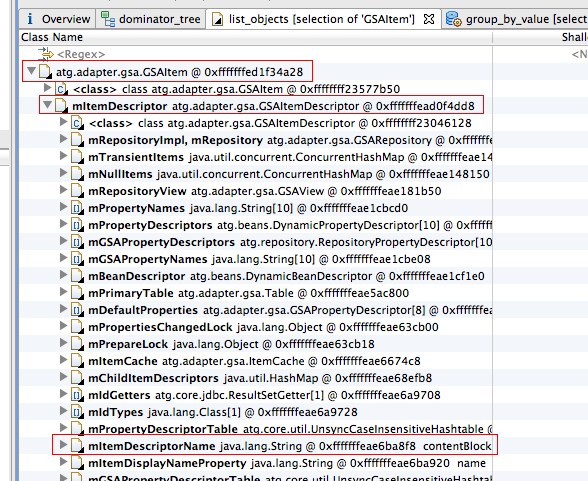
Right click on atg.adapter.gsa.GSAItem -> List objects -> with outgoing references

Once the objects are listed. To know what type of items. 
In GSAItem object, mItemDescriptor.mItemDescriptorName will give the name of the GSAItem.

We need to group by value "mItemDescriptor.mItemDescriptorName" on Class atg.adapter.gsa.GSAItem (in dominator_tree).
So go back to dominator_tree tab, right click on atg.adapter.gsa.GSAItem -> Java Basics -> Group By Value.


In Group By Value window, fill field with "mItemDescriptor.mItemDescriptorName" and click finish.

This will take time depending on the number of objects it needs to parse. 
Once it is done, you can see which type of items (GSAItems) take more space in jvm heap space. (sort it by Retained Heap)
In below scenario, ss-sku items took 333 MB of jvm heap space and number of ss-sku items in memory are 35,465 (i.e 35,465 items are cached in memory)


Hope this helps!


How to take thread dumps and heap dumps using java tools

1) To take thread dumps -
Once you have below java options
-Xdebug -Xrunjdwp:transport=dt_socket,server=y,suspend=n,address=8000
(Note: all tools mentioned below are available in <JAVA_HOME>/bin)

Using jdb
jdb -connect com.sun.jdi.SocketAttach:hostname=localhost,port=8000

> suspend
All threads suspended.
"where all" will give snapshot of all threads.
> where all
http-127.0.0.1-8443-6:
  [1] java.lang.Object.wait (native method)
  [2] java.lang.Object.wait (Object.java:485)
  [3] org.apache.tomcat.util.net.JIoEndpoint$Worker.await (JIoEndpoint.java:416)
  [4] org.apache.tomcat.util.net.JIoEndpoint$Worker.run (JIoEndpoint.java:442)
  [5] java.lang.Thread.run (Thread.java:662)
http-127.0.0.1-8443-5:
  [1] java.lang.Object.wait (native method)
  [2] java.lang.Object.wait (Object.java:485)
  [3] org.apache.tomcat.util.net.JIoEndpoint$Worker.await (JIoEndpoint.java:416)
  [4] org.apache.tomcat.util.net.JIoEndpoint$Worker.run (JIoEndpoint.java:442)
  [5] java.lang.Thread.run (Thread.java:662)
http-127.0.0.1-8443-4:
  [1] java.lang.Object.wait (native method)
  [2] java.lang.Object.wait (Object.java:485)
...
..
to resume all threads.
> resume

Using  jstack -
jstack <jvmid>  (you can get jvmid using jps)

For example -
C:\Documents and Settings\Administrator>jps
4416 Main
5800
3300 Jps
6676

C:\Documents and Settings\Administrator>jstack 4416
2011-12-27 16:32:19
Full thread dump Java HotSpot(TM) Server VM (19.0-b09 mixed mode):

"ajp-127.0.0.1-8009-Acceptor-0" daemon prio=6 tid=0x6fc39c00 nid=0x11fc runnable [0x6d27f000]
   java.lang.Thread.State: RUNNABLE
        at java.net.PlainSocketImpl.socketAccept(Native Method)
        at java.net.PlainSocketImpl.accept(PlainSocketImpl.java:390)
        - locked <0x14495ae0> (a java.net.SocksSocketImpl)

To get thread dump using jboss jmx-console, please go through below link
http://atgkid.blogspot.com/2011/10/how-to-take-thread-dumps-in-jboss.html

2) To take heap dumps - 
Using jmap (available from jdk 1.6 but can also be used on jvm with 1.4+ )
jmap -dump:format=b,file=<filename>.hprof <jvmid>

C:\Documents and Settings\Administrator>jps
4416 Main
5800
3300 Jps
6676

C:\Documents and Settings\Administrator>jmap -dump:format=b,file=sample.hprof 4416
Dumping heap to C:\Documents and Settings\Administrator\sample.hprof ...
Heap dump file created

Using java option -XX:+HeapDumpOnOutOfMemoryError
Once you have above java option, JVM will create heap dump once it is out of memory.

Using  jconsole - Java Monitoring and Management Console - JMX-compliant graphical tool for monitoring a Java virtual machine. It can monitor both local and remote JVMs
To use jconsole you need to have java option "-Dcom.sun.management.jmxremote"


heap dump file will be created in folder from where the application is run. For example - <JBOSS-HOME>/bin or <BEA-DOMAIN-HOME>/bin

Using  jvisualvm - comes with java 1.6 but can be used to visualize/monitor applications running on jdk 1.4 and higher. 
Monitor showing CPU and Heap Usage and total threads and classes. 
To get thread dump you can use

Sample heap dump taken using jvisualvm


To take thread dumps in jvisualvm


Sample Thread dump taken using jvisualvm 


Saturday, December 10, 2011

hitCount for referred items will not be increased while accessing parent item

While accessing an item, hitCount (in Dynamo component browser repository cache usage statistics) for referred items will not be increased.

For example - In PioneerCycling
In test4.jsp
<%@ taglib uri="dsp" prefix="dsp"%>
<dsp:page>
<dsp:importbean bean="/atg/commerce/catalog/ProductLookup"/>
<dsp:droplet name="ProductLookup" >
<dsp:param name="id" value="prod10023"/>
<dsp:param name="elementName" value="product"/>
<dsp:oparam name="output">
<dsp:valueof param="product.smallImage.url"/> <br>
</dsp:oparam>
</dsp:droplet>
</dsp:page>
By default PioneerCycling ProductCatalog has simple cache and item-cache-size for all items is 1000.
Before accessing this jsp

Product - accesscount is 0. Hit count is 0.
Media - accesscount is 0, hit count is 0.
Once test4.jsp is accessed for the first time.

Product - accesscount is 2, hit count is 0.
Media - accesscount is 6, hit count is 0.

First time access - In logs. select queries are fired.
[++SQLQuery++]
 SELECT t1.product_id,t1.version,t1.description,t1.nonreturnable,t1.brand,t1.end_date,t1.display_name,t1.disallow_recommend,
        t1.long_description,t1.creation_date,t1.start_date,t1.parent_cat_id,t1.product_type
   FROM dcs_product t1
  WHERE t1.product_id = ?
-- Parameters --
p[1] = {pd} prod10023 (java.lang.String)
[--SQLQuery--]
[++SQLSelect++]
 SELECT template_id,thumbnail_image_id,small_image_id,large_image_id
   FROM dcs_prd_media
  WHERE product_id=?
-- Parameters --
p[1] = {pd} prod10023 (java.lang.String)
[--SQLSelect--]

Once again if the test4.jsp is refreshed

Product - accessCount is 3, hit count is 1.
Media - accessCount is 6, hit count is 0.

As you can observe - neither the access count or hit count is increased for media items. But for product it got increased.
Note: Only first time queries are fired. Once items are cached there are no queries fired for product and media.
As test4.jsp is refreshed, product stats are getting increased but media stats are not getting increased.

Why?
Reason - (Below explanation is given by Oracle ATG support Nick Glover)
First time when product is accessed all its properties are loaded from database including media items, so for the first time accessCount for product and media items is increased. Once media items are loaded they are stored as references in the product property values. So, the next time the product is accessed, they don't need to be loaded at all, the product has a reference to them. This is not considered a cache hit on the media items because the media item cache is not being used in this situation; instead the product item cache is being used and its references to the media items are what is saving the trip to the database. And obviously, the hit ratio for media items is going to be 0% because the initial loading of them is a miss, and you have not done any direct requests for the media items that successfully found them in cache to get a cache hit.

Regarding Weak entry cache -
Suppose that number of products in application is 10000 and the item-cache-size is 5000
and number of media-items is 30000 (for each product 3 media-items) and the item-cache-size is 1000.
So if 1 product is accessed, 3 media items are loaded.

In above scenario, if 1000 products are accessed
product entry count is 1000 (in main cache)
media entry count is 1000 (in main cache)
media weak entry count is 2000 (in weak cache)

weak entry items in weak cache are not garbage collected until the referenced item (parent item) is removed/pushed from main cache.


Friday, November 25, 2011

Regarding ConcurrentUpdateException and InvalidVersionException

There are 3 places where order version is stored
1) Database level - dcspp_order.version
2) Repository item cache level - orderItem.getPropertyValue("version");
3) Session level - order.getVersion();

// This check is done in classes where order is modified
if (order.getVersion() != orderItem.getPropertyValue("version"))
     throw atg.commerce.order.InvalidVersionException

// This check is done while updating item
if (dcspp_order.version != orderItem.getPropertyValue("version"))
      throw atg.repository.ConcurrentUpdateException

Note: concurrency can be maintained on any repository item, please go through below documentation
http://docs.oracle.com/cd/E26180_01/Platform.94/RepositoryGuide/html/s0709maintainingitemconcurrencywithth01.html

atg.repository.ConcurrentUpdateException - Is thrown if 2 separate sessions (belong to 2 different instances) of same user edit same order simultaneously or if 2 applications are editing same order. One way to reproduce in cluster environment (in production)
Login in one browser 1  with one user suppose xyz and logout
Login in another browser 2  with same user xyz and logout
Login back in browser 1 with same user xyz

This exception is thrown in logs of instance (browser 1 session instance)
CONTAINER:atg.commerce.CommerceException; SOURCE:CONTAINER:atg.service.pipeline.RunProcessException: An exception was thrown from the context of the link named [updateCommerceItemObjects].; 
SOURCE:CONTAINER:atg.commerce.CommerceException: Saving order 2288449002 failed because doing so would result in data being overwritten. This save attempt had an out of date repository item [commerceItem].; 
SOURCE:atg.repository.ConcurrentUpdateException: no rows updated oldVersion=20 for item=commerceItem:ci55251446 in GSATransaction=atg.adapter.gsa.GSATransaction@6a77cca2    
thread=ajp-10.238.160.131-30100-37 transaction=TransactionImple < ac, BasicAction: aeea083:6d44:4ecb6eb0:da1fd5 status: ActionStatus.RUNNING >
Note: Typically item-cache-timeout by default is -1 (when not set) which means item will be in cache until invalidated. Suppose the item-cache-timeout for order is set to 30 mins.

Explanation -
When the user xyz login in one browser 1
  suppose his/her session is tied to one instance 1 and suppose his order version is incremented to 2.
logout
Note that user xyz order is cached in this instance 1 and its version is 2 and it will be there in the cache until item-cache-timeout which is 30 mins.

If the same user xyz tries to login using another browser 2
  suppose his/her session now got tied to another instance 2 and his order version will be incremented to 3.
logout
Note that user xyz order is cached in this instance 2 and its version is 3 and it will be there in the cache until 30 mins

since orderRepository has simple cache, instance 1 has no idea of updated version.
Note: If the browser 1 cookies are not removed, request will always go to instance 1.
In this 30 mins time, when user xyz login using browser 1, at the time of loadorder since the version in cache (which is 2) doesnt match with version in database
(which is 3) ConcurrentUpdateException is thrown.

This can also happen if the user in application like CSC and dotcom user both working on same order, then above exception is thrown

atg.commerce.order.InvalidVersionException -  is caused if 2 sessions (of same instance) of same user modifying same order simultaneously. 
One way to reproduce in dev environment (only 1 instance) or you need to make sure that 2 sessions belongs to same instance in cluster environment.

If the user has 2 seperate session in 2 seperate browsers, where both sessions are tied to one instance and since both session are updating same order, InvalidVersionException exceptions is thrown.

Explanation -
Whenever the order is updated, both order (session) version and order repository version are updated.
When updating if both order version and order repository version are not equal, then invalid version exception is thrown.

**** Error      Fri Nov 25 15:08:57 CST 2011    1322255337883   /atg/commerce/order/purchase/RepriceOrderDroplet        ---
CONTAINER:atg.service.pipeline.RunProcessException:
An exception was thrown from the context of the link named [updateOrderAfterReprice].; SOURCE:atg.commerce.order.InvalidVersionException: This order (2293186179) is out of date.
Changes have been made to the order and the operation should be resubmitted. Order version 4, Repository item version 9.
        at atg.service.pipeline.PipelineChain.runProcess(PipelineChain.java:371)
        at atg.service.pipeline.PipelineChainContext.runProcess(PipelineChainContext.java:185)
        at atg.service.pipeline.PipelineManager.runProcess(PipelineManager.java:453)
        at atg.service.pipeline.servlet.PipelineChainInvocation.service(PipelineChainInvocation.java:267)
        at atg.commerce.order.purchase.RepriceOrder.service(RepriceOrder.java:438)
        at atg.servlet.DynamoServlet.service(DynamoServlet.java:123)
        at atg.taglib.dspjsp.DropletTag.invokeServlet(Unknown Source)
        at atg.taglib.dspjsp.DropletTag.doAfterBody(Unknown Source)
        at org.apache.jsp.checkout.shippinginfo_jsp._jspx_meth_dsp_005fdroplet_005f8(shippinginfo_jsp.java:2128)
....stack trace CROPPED after 10 lines.
Caused by :atg.commerce.order.InvalidVersionException: This order (2293186179) is out of date. Changes have been made to the order and the operation should be resubmitted. Order version 4, Repository item version 9.
        at atg.commerce.order.OrderManager.updateOrder(OrderManager.java:2557)
        at atg.commerce.order.processor.ProcUpdateOrder.runProcess(ProcUpdateOrder.java:111)
        at atg.service.pipeline.PipelineLink.runProcess(PipelineLink.java:233)
        at atg.service.pipeline.PipelineChain.runProcess(PipelineChain.java:343)
        at atg.service.pipeline.PipelineChainContext.runProcess(PipelineChainContext.java:185)
        at atg.service.pipeline.PipelineManager.runProcess(PipelineManager.java:453)
        at atg.service.pipeline.servlet.PipelineChainInvocation.service(PipelineChainInvocation.java:267)
        at atg.commerce.order.purchase.RepriceOrder.service(RepriceOrder.java:438)
        at atg.servlet.DynamoServlet.service(DynamoServlet.java:123)
....stack trace CROPPED after 10 lines.

Tuesday, November 15, 2011

To start Motorprise application with oracle database

Below are the steps to start Motorprise application with oracle database.
To create Motorprise schema
Install oracle XE or oracle SE and connect using system/sys and create motorprise user.
create user motorprise identified by password1 default tablespace users temporary tablespace temp;
grant connect, resource to motorprise;
grant select any table to motorprise;
grant create any table to motorprise;
grant update any table to motorprise;
grant delete any table to motorprise;
grant alter any table to motorprise;
grant create any view to motorprise;
Install Motorprise scripts
Connect using motorprise user
Connect motorprise/password1
Run following script
@<ATGDir>\MotopriseJSP\sql\install\oracle\motorpriseall_ddl.sql
For example:
@C:\ATG\ATG9.1\MotorpriseJSP\sql\install\oracle\motorpriseall_ddl.sql
Commit.;
Exporting test data from Solid to Oracle
1) Check license files. If not available copy license files to your <ATGDir>\home\localconfig
2) Copy solid.db file from
Copy <ATGDir>\DAS\solid\atgdb\solid.db to <ATGDir>\DAS\solid\i486-unknown-win32\
For example
C:\ATG\ATG9.1\DAS\solid\atgdb\solid.db to C:\ATG\ATG9.1\DAS\solid\i486-unknown-win32\
3) Connect to solid database
Add below lines in <ATGDir>\home\localconfig\atg\dynamo\service\jdbc\FakeXADataSource.properties
For example:
C:\ATG\ATG9.1\home\localconfig\atg\dynamo\service\jdbc\FakeXADataSource.properties
$class=atg.service.jdbc.FakeXADataSource
driver=solid.jdbc.SolidDriver
URL=jdbc:solid://localhost:1313
user=motorprise
password=motorprise
4) Start solid database –
Execute <ATGDir>\DAS\solid\ i486-unknown-win32\solfe.exe
C:\ATG\ATG9.1\DAS\solid\i486-unknown-win32\solfe.exe
5) Exporting Motorprise data from solid to xml file
cd C:\ATG\ATG9.1\home
bin\startSQLRepository -m MotorpriseJSP -export all users.xml -repository /atg/userprofiling/ProfileAdapterRepository
bin\startSQLRepository -m MotorpriseJSP -export all products.xml -repository /atg/commerce/catalog/ProductCatalog
bin\startSQLRepository -m MotorpriseJSP -export all priceLists.xml -repository /atg/commerce/pricing/priceLists/PriceLists
bin\startSQLRepository -m MotorpriseJSP -export all inventory.xml -repository /atg/commerce/inventory/InventoryRepository
6) Connect to Oracle database
Now point FakeXADataSource to Oracle.
Add below lines in <ATGDir>\home\localconfig\atg\dynamo\service\jdbc\FakeXADataSource.properties
In C:\ATG\ATG9.1\home\localconfig\atg\dynamo\service\jdbc\FakeXADataSource.properties
$class=atg.service.jdbc.FakeXADataSource
URL=jdbc:oracle:thin:@localhost:1521:xe
user=motorprise
password=password1
needsSeparateUserInfo=true
readOnly=false
driver=oracle.jdbc.xa.client.OracleXADataSource
Note: Make sure you have classes12.jar or ojdbc.jar in classpath
CLASSPATH=C:\oraclexe\app\oracle\product\10.2.0\server\jdbc\lib\ojdbc14.jar;
If you are using oracle XE, run below steps to increase processes, sessions and transactions.
sqlplus sys/oracle as sysdba
alter system set processes = 150 scope = spfile;
alter system set sessions = 300 scope = spfile;
alter system set transactions = 330 scope = spfile;
shutdown immediate;
startup;
7) Import Motorprise data from xml to oracle
cd C:\ATG\ATG9.1\home
bin\startSQLRepository -m MotorpriseJSP -import users.xml -repository /atg/userprofiling/ProfileAdapterRepository
bin\startSQLRepository -m MotorpriseJSP -import products.xml -repository /atg/commerce/catalog/ProductCatalog
bin\startSQLRepository -m MotorpriseJSP -import priceLists.xml -repository /atg/commerce/pricing/priceLists/PriceLists
bin\startSQLRepository -m MotorpriseJSP -import inventory.xml -repository /atg/commerce/inventory/InventoryRepository
Build Motorprise.ear
Create Motorprise.ear – go to <ATGDir>\home\bin
cd C:\ATG\ATG9.1\home\bin
runAssembler C:\ATG\ATG9.1\Motorprise.ear -m DCS.PublishingAgent DafEar.admin MotorPriseJSP
Note: DCS.PublishingAgent is optional. Keep it if you have CA/BCC installed.
Please make sure that your FakeXADataSource is pointing to your local oracle.
Create FakeXADataSource.properties and JTDataSource.properties in
<ATGDir>\ \MotorpriseJSP\config\atg\dynamo\service\jdbc
In FakeXADataSource.properties
$class=atg.service.jdbc.FakeXADataSource
URL=jdbc:oracle:thin:@localhost:1521:xe
user=motorprise
password=password1
needsSeparateUserInfo=true
readOnly=false
driver=oracle.jdbc.xa.client.OracleXADataSource
In JTDataSource.properties
$class=atg.service.jdbc.MonitoredDataSource
dataSource=/atg/dynamo/service/jdbc/FakeXADataSource
Finally Deploy Motorprise.ear
Use http://localhost:<port>/Motorprise/ to bring up the login page of Motorprise application.

Friday, November 11, 2011

To Prevent Cross site scripting.

By default when submitting form using dsp:form or dsp:a requiresSessionConfirmation is set to true.
Set warnOnSessionConfirmationFailure set to true and enforceSessionConfirmation set to true in /atg/dynamo/Configuration
Once you have above settings, for every dsp:form and dsp:a there will be a hidden _dynSessConf number associated with it and will be same across all forms in that session.

At the time form submit,
if session is invalidated or timed-out or if the _dynSessConf number doesn't match with one in current session,
then
    if requiresSessionConfirmation and enforceSessionConfirmation set to true,
          response code is set 409 and form is not processed.

Source - http://download.oracle.com/docs/cd/E23095_01/Platform.93/PageDevGuide/html/s0606preventingcrosssiteattacks01.html

Issues with jsessionid in url

When application server will append jsessionid to url?
If the request is first from client and there are no cookies (related to that commerce site) at client side,
   then application server will create new session and have that sessionid appended to url (as url agrument parameter seperated by ";" its not query parameter "?")
 and will also set jsessionid cookie at the client side.

Why application server is appending to url?  
To support browsers which do not allow cookies.
As mentioned in  http://randomcoder.org/articles/jsessionid-considered-harmful
"Cookieless sessions are achieved in Java by appending a string of the format ;jsessionid=SESSION_IDENTIFIER to the end of a URL. To do this, all links emitted by your website need to be passed through either HttpServletResponse.encodeURL(), either directly or through mechanisms such as the JSTL <c:out /> tag. Failure to do this for even a single link can result in your users losing their session forever." 

 For example: in url
 http://localhost:8080/store/store/product/view_product_details.jsp;jsessionid=EF8300224952E06E951475223380F9B0?_DARGS=/store/store/product/includes/vpd_product_selection_display_fg.jsp

And in the generated html page - 
<form action="/store/store/product/view_product_details.jsp;jsessionid=EF08475F9F98B45556DCA1946F35C013_DARGS=/store/store/product/includes/vpd_product_selection_display_fg.jsp" method="post" id="add-to-cart">

Issues having jsessionid in url
But having "jsessionid" in the url leads to below problems
1) If we are caching the common pages at AKAMAI level.
     For example:
User 1 requested page product_details.jsp and Since it is the first request, appserver includes jsessionid in the urls in the generated page. 
Akamai cached the page (product_details.jsp) which got generated for user 1. 
When user 2 requested same page, Akamai serves that cached page, the request wont even go to web server or app server. 
Now if the user 2 tries to add an item, the form action url contains a session id of user 1 and when it comes to webserver/load balancer
which redirects the request based on sessionid to appserver, the appserver will add the item to user 2 session.

2) Google bot problems as mentioned in http://randomcoder.org/articles/jsessionid-considered-harmful
    "To prevent abuse, search engines such as Google associate web content with a single URL, and penalize sites which have identical content reachable from multiple, unique URLs. Because a URL-encoded session is unique per visit, multiple visits by the same search engine bot will return identical content with different URLs. This is not an uncommon problem; a test search for ;jsessionid in URLs returned around 79 million search results."

   "Because the session identifier is included in the URL, an attacker could potentially impersonate a victim by getting the victim to follow a session-encoded URL to your site. If the victim logs in, the attacker is logged in as well - exposing any personal or confidential information the victim has access to. This can be mitigated somewhat by using short timeouts on sessions, but that tends to annoy legitimate users." 

How to fix above issues?
Below are three ways to fix this issue.
1) Fix using filter is mentioned in http://randomcoder.org/articles/jsessionid-considered-harmful

Assuming you have mod_rewrite enabled in your Apache instance, use this configuration in your apache config:


# This should strip out jsessionids from google
RewriteCond %{HTTP_USER_AGENT} (googlebot) [NC]
ReWriteRule ^(.*);jsessionid=[A-Za-z0-9]+(.*)$ $1$2 [L,R=301]
This rule says for request where the user agent contains “googlebot” (with case insensitive matching), rewrite the URL without the jsessionid. It seems to work nicely.
By using above way url rewriting is done at web server level.

3)Other way is to use http://www.tuckey.org/urlrewrite/
"Based on the popular and very useful mod_rewrite for apache, UrlRewriteFilter is a Java Web Filter for any J2EE compliant web application server (such as ResinOrion or Tomcat), which allows you to rewrite URLs before they get to your code. It is a very powerful tool just like Apache's mod_rewrite."

Example - 
in /WEB-INF/web.xml
      <filter>
            <filter-name>UrlRewriteFilter</filter-name>
            <filter-class>org.tuckey.web.filters.urlrewrite.UrlRewriteFilter</filter-class>
            <init-param>
                  <param-name>logLevel</param-name>
                  <param-value>INFO</param-value>
            </init-param>

            <init-param>
                  <param-name>confPath</param-name>
                  <param-value>/WEB-INF/urlrewrite.xml</param-value>
            </init-param>
      </filter>

      <filter-mapping>
            <filter-name>UrlRewriteFilter</filter-name>
            <url-pattern>/*</url-pattern>
      </filter-mapping>

in urlrewrite.xml
     <rule>
          <from>^(.*);jsessionid=[A-Za-z0-9\-\+\*\._]+(.*)$</from>
          <to type="redirect">$1$2</to>
     </rule>
Please note that this filter mapping should be before PageFilter, so that before handling request to PageFilter the jsessionid should be stripped from url.